

Rayfield:CreateWindow(props) creates the window and returns its handle. Tabs, tags, notifications, popups, and theme changes all come from that handle.
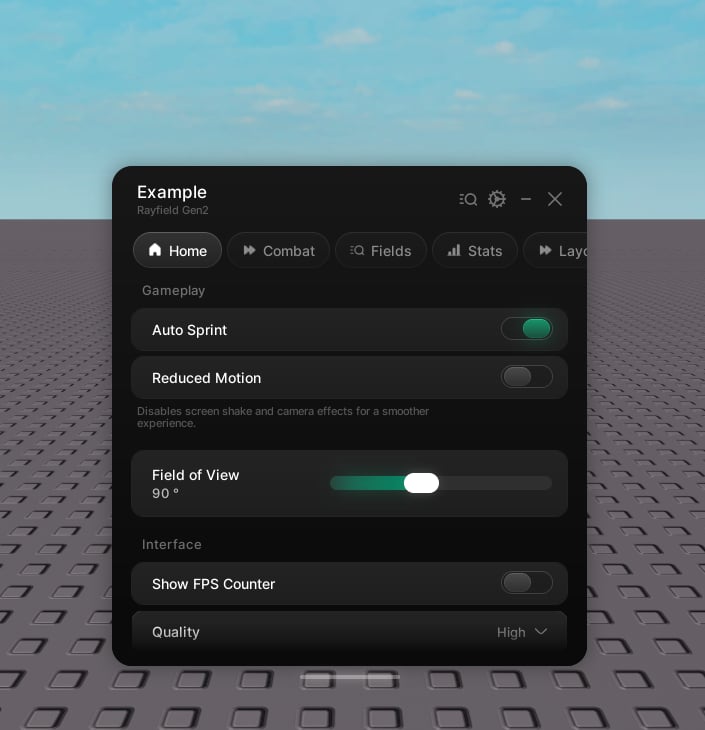
Properties
string
default:"\"Rayfield Window\""
The window title.
string
A smaller line beneath the title.
string | table
default:"\"default\""
A built-in theme name (
"default", "cobalt", "ember", "amethyst", "frost", "rose") or a theme table. See Themes.string | number
An icon shown beside the title.
boolean
default:"false"
Put the tabs in a rail down the left instead of a strip across the top, and give the content its own card. The window is wider and shorter to suit it. On a narrow screen the rail keeps its icons and drops the labels. See Tabs.
string
A line under the player’s name at the base of the sidebar rail. Leave it out and the name stands on its own. Sidebar layout only.
string
default:"\"Rayfield\""
Label on the collapsed pill while the window is hidden.
string | number
default:"Rayfield icon"
Icon on the collapsed pill while the window is hidden.
boolean
default:"false"
Collapse to a round icon badge rather than an icon-and-label pill.
string
default:"player's locale"
Pins the language. Leave it out to follow the player’s Roblox language. See Localization.
table
Language tables keyed by locale id.
function
A custom resolver used instead of tables.
Enum.Font | Font
default:"BuilderSans"
A stand-in font shown in secure mode while the brand font downloads.
Preview only. This is on the preview channel and is not in the stable release. It can change or be dropped before it lands there.
string
A Sentivel ping URL or token. The window pings it while it’s open, so you can see whether your script is running. See Uptime monitoring.
Methods
The window handle exposes everything you need at runtime.Building
Tab
Add a tab. See Tabs and groups.
Sidebar
Set the line under the player’s name in the sidebar rail. Pass nothing to drop it and leave the name on its own. Players can hide the block from the settings tab.
The collapsed pill can be dragged anywhere on screen and stays where it’s put. A press only counts as a tap if the cursor barely moved, so dragging it never opens the window by accident.
Messages
Show a notification card in the corner. See Notifications.
Drop a toast in from the top. See Notifications.
Visibility
Reveal the window.
Collapse the window.
Toggle between shown and hidden.
Collapse to the top bar.
Go to a tab by its handle or name. Selects it, so the tab strip follows. Equivalent to
tab:Select().Destroy the interface.
boolean
true once Unload has run. The handle is spent after that.Theme and language
Restyle everything at runtime. Colours and numeric values tween across; corner radii, fonts, and gradients apply instantly.
Switch every label to another language live.
Swap the copy resolver.
Add a language pack at runtime.
Saving
boolean
Save now. Pass a name to target a saved configuration, or leave it out for the default file.
boolean
Load now.
{ string }
Names of the saved configurations.
boolean
Delete a saved configuration.
string, string
The directory and full path of the config file.
any
Read a saved value by its flag. Also available as
window.Flags[flag].boolean
Write a saved value by its flag. This updates the UI and fires the callback. Returns
false if the flag is unknown.