> ## Documentation Index
> Fetch the complete documentation index at: https://docs.sirius.menu/llms.txt
> Use this file to discover all available pages before exploring further.
# Windows
> Create a window and control it at runtime. Everything else hangs off the window handle.
`Rayfield:CreateWindow(props)` creates the window and returns its handle. Tabs, tags, notifications, popups, and theme changes all come from that handle.
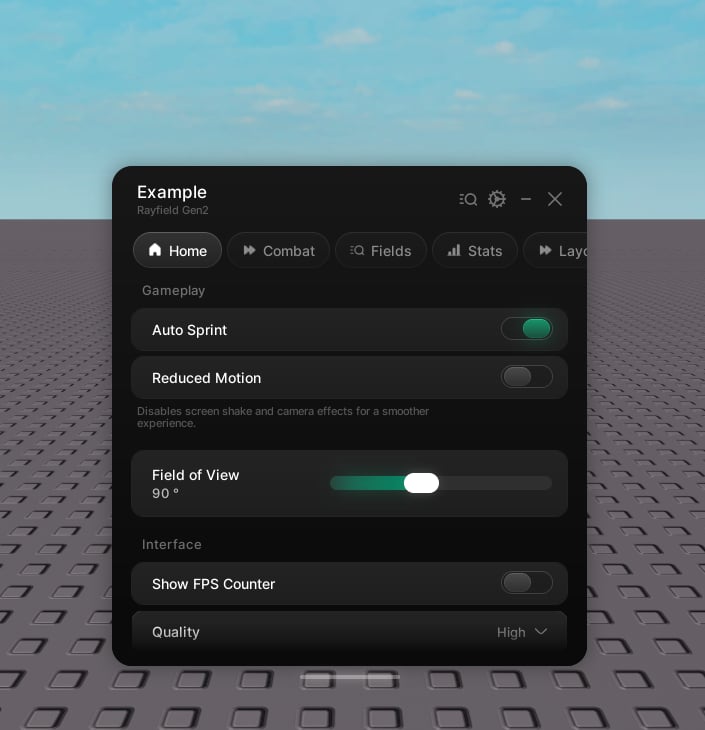 ```lua theme={null}
local window = Rayfield:CreateWindow({
name = "Example Hub",
subtitle = "Rayfield Gen2",
theme = "cobalt",
})
```
## Properties
The window title.
A smaller line beneath the title.
A built-in theme name (`"default"`, `"cobalt"`, `"ember"`, `"amethyst"`, `"frost"`, `"rose"`) or a theme table. See [Themes](/rayfield-gen2/themes).
An icon shown beside the title.
Enables saving. See [Saving](/rayfield-gen2/saving).
Save on every change.
Load saved state the first time the window opens.
Name of the saved file.
Optional folder to keep the file in.
Pins the language. Leave it out to follow the player's Roblox language. See [Localization](/rayfield-gen2/localization).
Language tables keyed by locale id.
A custom resolver used instead of tables.
A stand-in font shown in secure mode while the brand font downloads.
## Methods
The window handle exposes everything you need at runtime.
### Building
Add a tab. See [Tabs and groups](/rayfield-gen2/tabs).
Add a pill beside the title. See [Tags](/rayfield-gen2/tags).
### Messages
Show a notification card in the corner. See [Notifications](/rayfield-gen2/notifications).
Drop a toast in from the top. See [Notifications](/rayfield-gen2/notifications).
Float a modal dialog or changelog over a dimmed backdrop. See [Popups](/rayfield-gen2/popups).
### Visibility
Reveal the window.
Collapse the window.
Toggle between shown and hidden.
Collapse to the top bar.
Jump to a tab by its handle or name.
Destroy the interface.
### Theme and language
Restyle everything at runtime. Colours and sizes tween across.
Switch every label to another language live.
Swap the copy resolver.
Add a language pack at runtime.
### Saving
Save now. Pass a name to target a saved configuration, or leave it out for the default file.
Load now.
Names of the saved configurations.
Delete a saved configuration.
Read a saved value by its flag. Also available as `window.Flags[flag]`.
Write a saved value by its flag. This updates the UI and fires the callback. Returns `false` if the flag is unknown.
```lua theme={null}
window:Navigate("Home")
window:ChangeTheme("ember")
window:ToggleHide()
```
```lua theme={null}
local window = Rayfield:CreateWindow({
name = "Example Hub",
subtitle = "Rayfield Gen2",
theme = "cobalt",
})
```
## Properties
The window title.
A smaller line beneath the title.
A built-in theme name (`"default"`, `"cobalt"`, `"ember"`, `"amethyst"`, `"frost"`, `"rose"`) or a theme table. See [Themes](/rayfield-gen2/themes).
An icon shown beside the title.
Enables saving. See [Saving](/rayfield-gen2/saving).
Save on every change.
Load saved state the first time the window opens.
Name of the saved file.
Optional folder to keep the file in.
Pins the language. Leave it out to follow the player's Roblox language. See [Localization](/rayfield-gen2/localization).
Language tables keyed by locale id.
A custom resolver used instead of tables.
A stand-in font shown in secure mode while the brand font downloads.
## Methods
The window handle exposes everything you need at runtime.
### Building
Add a tab. See [Tabs and groups](/rayfield-gen2/tabs).
Add a pill beside the title. See [Tags](/rayfield-gen2/tags).
### Messages
Show a notification card in the corner. See [Notifications](/rayfield-gen2/notifications).
Drop a toast in from the top. See [Notifications](/rayfield-gen2/notifications).
Float a modal dialog or changelog over a dimmed backdrop. See [Popups](/rayfield-gen2/popups).
### Visibility
Reveal the window.
Collapse the window.
Toggle between shown and hidden.
Collapse to the top bar.
Jump to a tab by its handle or name.
Destroy the interface.
### Theme and language
Restyle everything at runtime. Colours and sizes tween across.
Switch every label to another language live.
Swap the copy resolver.
Add a language pack at runtime.
### Saving
Save now. Pass a name to target a saved configuration, or leave it out for the default file.
Load now.
Names of the saved configurations.
Delete a saved configuration.
Read a saved value by its flag. Also available as `window.Flags[flag]`.
Write a saved value by its flag. This updates the UI and fires the callback. Returns `false` if the flag is unknown.
```lua theme={null}
window:Navigate("Home")
window:ChangeTheme("ember")
window:ToggleHide()
```