> ## Documentation Index
> Fetch the complete documentation index at: https://docs.sirius.menu/llms.txt
> Use this file to discover all available pages before exploring further.
# Tabs and groups
> Organise a window into tabs, sections, and grids.
## Tabs
`window:CreateTab(props)` adds a tab to the sidebar. The first visible tab opens automatically.
```lua theme={null}
local tab = window:CreateTab({ name = "Combat", icon = 93364949241311 })
```
The tab label.
An icon shown beside the label.
A tab creates any element, plus sections and groups. It also has `Select()`, `Deselect()`, and `Remove()`.
## Sections
A section is a heading that labels the controls beneath it.
```lua theme={null}
tab:CreateSection({ name = "Aiming", icon = 93364949241311 })
```
## Groups
A group arranges its children along one axis. Groups nest, so a row of columns forms a grid. Set `direction` to `"row"` (the default) or `"column"`.
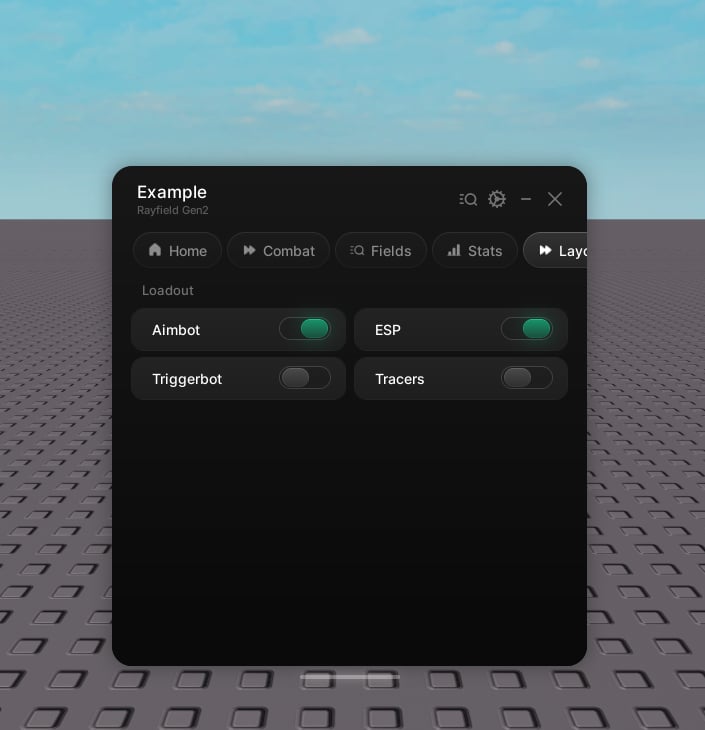 ```lua theme={null}
local grid = tab:CreateGroup()
local left = grid:CreateGroup({ direction = "column" })
left:CreateToggle({ name = "Aimbot" })
left:CreateToggle({ name = "Triggerbot" })
local right = grid:CreateGroup({ direction = "column" })
right:CreateToggle({ name = "ESP" })
right:CreateToggle({ name = "Tracers" })
```
Rows hold the compact elements (button, toggle, stat) along with sliders, and wrap to a new line when they fill up. Columns also take dropdowns and sections. A group offers `CreateSection` and `CreateGroup` of its own.
Input, keybind, and color picker are full-width and live at the tab level. Create those directly on the tab, not inside a group.
```lua theme={null}
local grid = tab:CreateGroup()
local left = grid:CreateGroup({ direction = "column" })
left:CreateToggle({ name = "Aimbot" })
left:CreateToggle({ name = "Triggerbot" })
local right = grid:CreateGroup({ direction = "column" })
right:CreateToggle({ name = "ESP" })
right:CreateToggle({ name = "Tracers" })
```
Rows hold the compact elements (button, toggle, stat) along with sliders, and wrap to a new line when they fill up. Columns also take dropdowns and sections. A group offers `CreateSection` and `CreateGroup` of its own.
Input, keybind, and color picker are full-width and live at the tab level. Create those directly on the tab, not inside a group.