> ## Documentation Index
> Fetch the complete documentation index at: https://docs.sirius.menu/llms.txt
> Use this file to discover all available pages before exploring further.
# Keybind
> A rebindable key or mouse button.
A keybind captures a key. Click the box, press a key or mouse button to bind it, and press Backspace to clear.
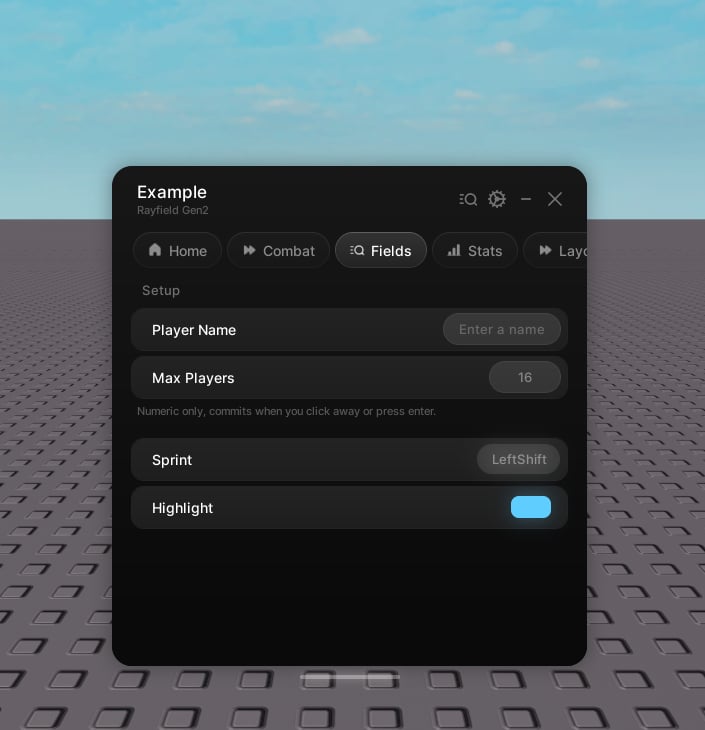 ```lua theme={null}
tab:CreateKeybind({
name = "Sprint",
value = Enum.KeyCode.LeftShift,
callback = function(key)
print("Pressed", key)
end,
})
```
Keybinds are full-width and live at the tab level. Create them directly on the tab, not inside a group.
## Properties
The label.
Hint text under the label. Optional.
An icon shown beside the label. Optional.
The initial bind. A `KeyCode`, a mouse button, or its name.
Hold mode. See below.
Seconds to hold before a press counts, in hold mode.
The save key. Optional.
Skip saving.
See below.
Runs with the new key when the bind itself changes.
## Hold mode
By default `callback(key)` fires on each press. In hold mode it fires `callback(true)` once the key is held past the threshold and `callback(false)` on release, so a quick tap is ignored.
## Handle
The current bind.
Set the bind. Pass `true` as the second argument to skip `onChanged`.
```lua theme={null}
tab:CreateKeybind({
name = "Sprint",
value = Enum.KeyCode.LeftShift,
callback = function(key)
print("Pressed", key)
end,
})
```
Keybinds are full-width and live at the tab level. Create them directly on the tab, not inside a group.
## Properties
The label.
Hint text under the label. Optional.
An icon shown beside the label. Optional.
The initial bind. A `KeyCode`, a mouse button, or its name.
Hold mode. See below.
Seconds to hold before a press counts, in hold mode.
The save key. Optional.
Skip saving.
See below.
Runs with the new key when the bind itself changes.
## Hold mode
By default `callback(key)` fires on each press. In hold mode it fires `callback(true)` once the key is held past the threshold and `callback(false)` on release, so a quick tap is ignored.
## Handle
The current bind.
Set the bind. Pass `true` as the second argument to skip `onChanged`.